

Hiring New Team Member
Purpose: Hire reliable WordPress contractors independently
Owner: Operations Manager
Budget Authority: Unlimited for trial payments ($25/candidate)
Timeline: 8-10 days from job post to hire
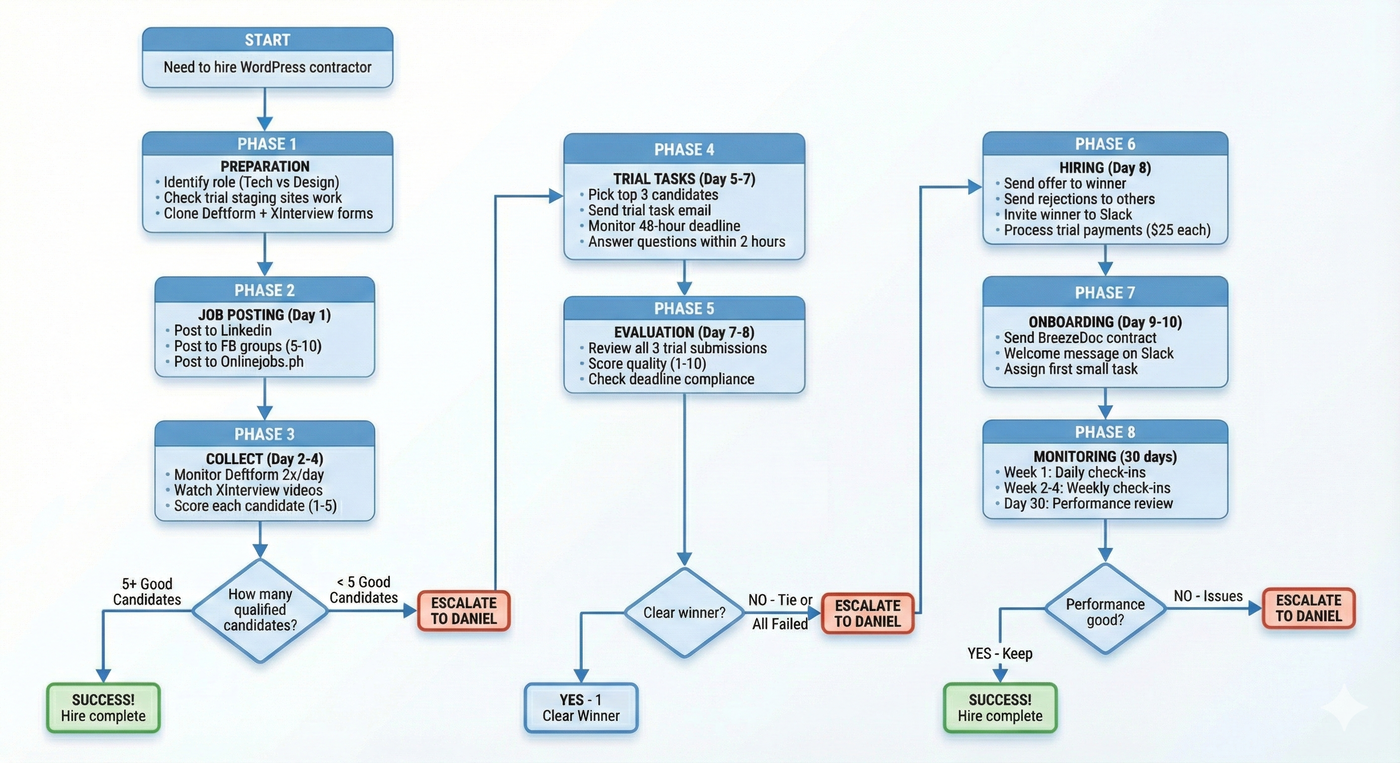
🔄 HIRING PROCESS FLOWCHART (Big Picture)
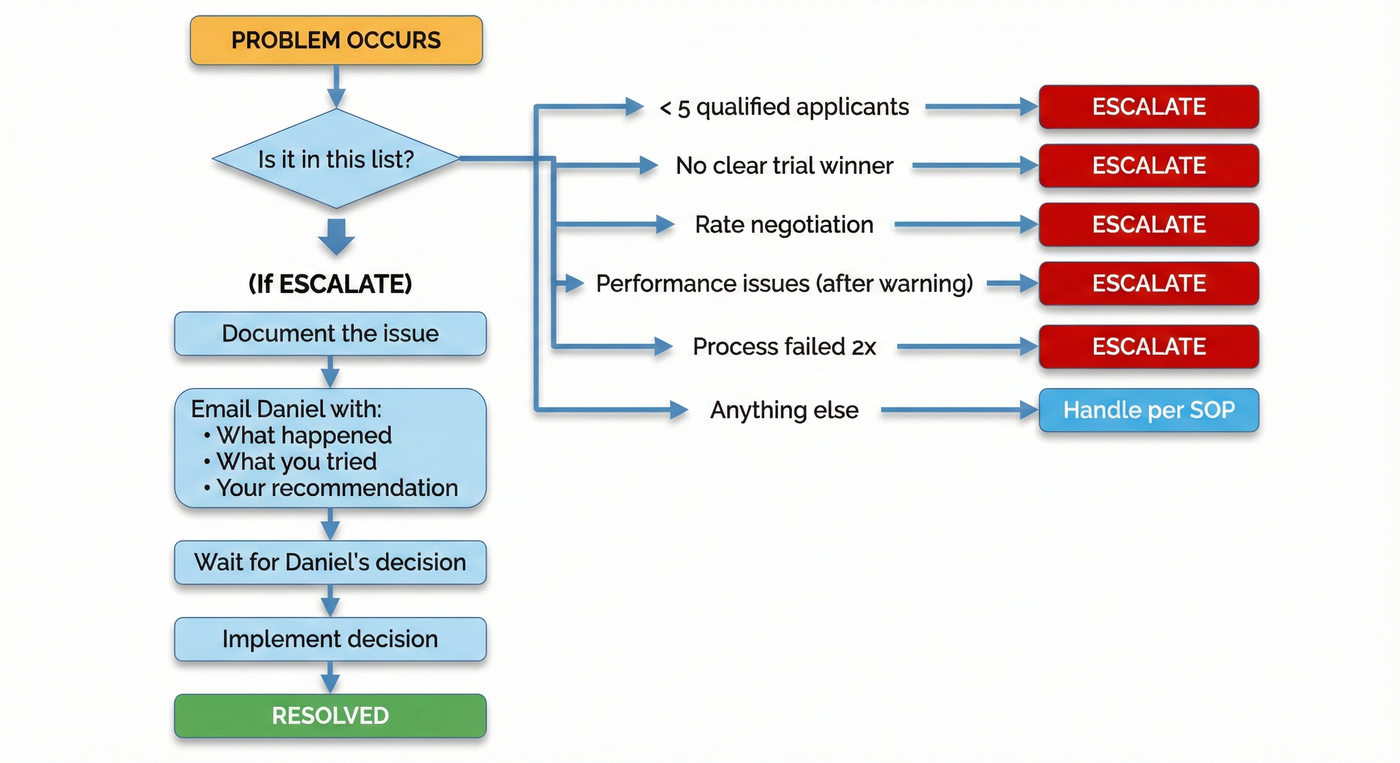
🚨 ESCALATION FLOWCHART
📊 DECISION MATRIX: Should I Reject This Candidate?
Issue | Deftform Stage | Video Stage | Trial Stage | Action |
|---|---|---|---|---|
Can't work Malaysia hours | ❌ REJECT | ❌ REJECT | N/A | Auto-reject |
Poor English (many errors) | ❌ REJECT | ❌ REJECT | N/A | Auto-reject |
Generic/copy-paste answers | ❌ REJECT | N/A | N/A | Auto-reject |
No portfolio (design role) | ❌ REJECT | N/A | N/A | Auto-reject |
Vague availability | ⚠️ FLAG | ❌ REJECT | N/A | Reject if still vague in video |
Reading from script | N/A | ⚠️ FLAG | N/A | Lower score, don't auto-reject |
Can't explain process | N/A | ❌ REJECT | N/A | Auto-reject |
Missed deadline | N/A | N/A | ❌ REJECT | Auto-reject |
Went silent during trial | N/A | N/A | ❌ REJECT | Auto-reject |
Poor quality work | N/A | N/A | ❌ REJECT | Auto-reject |
Claimed 5+ hours for trial | N/A | N/A | ⚠️ ESCALATE | Use "Exceeded Hours" template |
📋 DETAILED STEP-BY-STEP CHECKLIST
PHASE 1: PREPARATION (Before posting job)
☐ Step 1.1: Identify Role Need
[ ] Determine what role to hire for:
[ ] WordPress Technical Specialist (maintenance/troubleshooting)
[ ] WordPress Website Builder (design/implementation)
[ ] Other: _______________
[ ] Confirm budget: $10/hour standard rate
[ ] Confirm hours needed: 10-20 hours/week
[ ] List specific tasks they'll handle (write 5-7 bullet points)
☐ Step 1.2: Prepare Trial Environment
[ ] Go to SiteGround hosting account
[ ] Navigate to staging sites:
Tech role: trial-tech-alpha.bingostaging1.com/wp-admin
Design role: trial-design-alpha.bingostaging1.com/wp-admin
[ ] Test admin login works:
Username: trial_candidate
Password: TrialPass2024!
[ ] Verify trial site is in "broken" state (for tech role)
[ ] Verify trial site has ugly homepage (for design role)
[ ] If sites need reset: Restore from backup in SiteGround
☐ Step 1.3: Set Up Forms
[ ] Log into Deftform (Daniel's email)
[ ] Clone existing form template:
Tech role: https://forms.bingodigital.marketing/oT0j3y
Design role: https://forms.bingodigital.marketing/P4hNRg
[ ] Update form title with current date
[ ] Test form submission
[ ] Log into XInterview (Daniel's email: blackflam85@gmail.com, pass: XQpEfYaq8JAs)
[ ] Clone existing interview template:
[ ] Copy XInterview link
[ ] Paste into Deftform redirect URL
[ ] Test full flow: Form → XInterview
PHASE 2: JOB POSTING (Day 1)
☐ Step 2.1: Prepare Job Post
[ ] Open job post template document: sample [link here]
[ ] Customize for current role if needed
[ ] Update Deftform application link in job post
[ ] Copy final job post text
☐ Step 2.2: Post to Platforms
[ ] LinkedIn:
[ ] Log into Daniel's LinkedIn
[ ] Post job ad
[ ] Add hashtags: #WordPressJobs #RemoteWork #Hiring
[ ] Facebook Groups (post to 5-10 groups):
[ ] Elementor Experts
[ ] WordPress Developers
[ ] Freelance WordPress Developers
[ ] Remote WordPress Jobs
[ ] [Add other groups Daniel uses]
Note: Adjust tone to match group rules (some don't allow direct hiring posts)
[ ] Onlinejobs.ph:
[ ] Log in
[ ] Create new job post
[ ] Set to receive applications via external link (Deftform)
[ ] Other platforms: [List any others]
☐ Step 2.3: Set Reminders
[ ] Calendar: Day 3 - Review applications
[ ] Calendar: Day 5 - Send trial tasks (at Google drive)
[ ] Calendar: Day 8 - Review trial submissions
PHASE 3: APPLICATION REVIEW (Day 2-4)
☐ Step 3.1: Monitor Submissions Daily
[ ] Check Deftform dashboard 2x per day (morning/evening)
[ ] Check XInterview dashboard 2x per day
[ ] Track in spreadsheet:
Name | Email | Deftform Score (1-5) | Video Score (1-5) | Notes
☐ Step 3.2: Screen Deftform Responses
Review each submission for:
[ ] Can they work Malaysia hours (GMT+8)? → If NO, reject
[ ] Do answers show problem-solving ability? → Rate 1-5
[ ] Communication quality in English? → Rate 1-5
[ ] Red flags present? (see red flag checklist below) → If YES, reject
Scoring System:
5 points = Excellent, clear, detailed
3-4 points = Good enough, acceptable
1-2 points = Poor, vague, concerning
Auto-reject if any answer scores 1-2
☐ Step 3.3: Watch XInterview Videos
For candidates who passed Deftform:
[ ] Watch all 3 video responses
[ ] Rate each video 1-5 on:
Communication clarity
Honesty about limitations
Problem-solving approach
Availability confirmation
Red flags in videos:
Reading from script (overly rehearsed)
Can't articulate problem-solving process
Vague about availability
Poor English communication
Seems overconfident/arrogant
☐ Step 3.4: Create Shortlist
[ ] By Day 4 evening, rank all candidates
[ ] Select top 5 candidates (combined Deftform + Video scores)
[ ] If fewer than 5 good candidates → ESCALATE TO DANIEL
[ ] If 5+ good candidates → proceed to trial tasks
PHASE 4: TRIAL TASKS (Day 5-7)
☐ Step 4.1: Select Top 3 Candidates
[ ] From your shortlist of 5, pick top 3
[ ] Verify they confirmed availability in video
[ ] Verify no red flags
☐ Step 4.2: Send Trial Task Emails
Email Template Location: [LINK HERE]
For each of the 3 candidates:
[ ] Personalize email with their name
[ ] Include staging site credentials
[ ] For Tech role: Send Trial Task A
[ ] For Design role: Send Trial Task B + content doc + reference sites
[ ] Set deadline: 48 hours from email timestamp
[ ] Mark in tracking spreadsheet: "Trial Sent [Date/Time]"
[ ] Add calendar reminder for deadline
☐ Step 4.3: Monitor Trial Progress
During the 48-hour trial period:
[ ] Check email 3x per day for questions
[ ] If candidate asks questions → respond within 2 hours
[ ] If candidate goes silent → send check-in at 24-hour mark
[ ] Track communication quality in spreadsheet
Check-in Email Template (if no communication after 24 hours):
Hi [Name], Just checking in on the trial task. You have 24 hours remaining until the deadline. Let me know if you're on track or if you have any questions. DanielPHASE 5: EVALUATION (Day 7-8)
☐ Step 5.1: Review Trial Submissions
Technical Role Evaluation:
[ ] Did they meet the 48-hour deadline? → YES/NO
[ ] Did they fix all 3 problems? → YES/NO
[ ] Quality of documentation? → Rate 1-5
[ ] Did they communicate during trial? → YES/NO
[ ] Load time improved? → YES/NO
[ ] Would you trust them with client work? → YES/NO
Design Role Evaluation:
[ ] Did they meet the 48-hour deadline? → YES/NO
[ ] Does design look professional? → Rate 1-5
[ ] Mobile responsive? → YES/NO
[ ] Contact form works? → YES/NO
[ ] Design decisions explained well? → Rate 1-5
[ ] Would clients approve this quality? → YES/NO
☐ Step 5.2: Rank Trial Submissions
[ ] Score each candidate's trial work (total points out of 10)
[ ] Identify clear winner
[ ] If no clear winner or all failed → ESCALATE TO DANIEL
[ ] If tie between 2 candidates → ESCALATE TO DANIEL
[ ] If 1 clear winner → proceed to offer
☐ Step 5.3: Check for Time Fraud
If candidate reported excessive hours:
[ ] Did they claim more than 4 hours for a 2-3 hour task?
[ ] If YES: Use email template "Exceeded Hours - Initial"
[ ] Wait for their response
[ ] If they insist on excessive hours: Use template "Exceeded Hours - Reject"
[ ] If they adjust to reasonable hours: Use template "Exceeded Hours - Accept"
PHASE 6: HIRING DECISION (Day 8)
☐ Step 6.1: Send Job Offer to Winner
[ ] Use job offer email template
[ ] Personalize with their name and role
[ ] Set start date (usually within 3-5 days)
[ ] Send Slack invitation:
[ ] Open Bingo Digital Slack workspace
[ ] Click workspace name → "Invite People"
[ ] Enter candidate's email
[ ] Select "Guest" account type
[ ] Add to channel: #contractors-welcome
[ ] Send invitation
[ ] Request payment details (PayPal for international, FPX for Malaysian)
☐ Step 6.2: Send Rejection Emails
[ ] To the 2 candidates who completed trials but didn't win
[ ] Use rejection email template
[ ] Request payment details for their $25 trial fee
[ ] Process payment within 48 hours
☐ Step 6.3: Process Trial Payments
[ ] Winner: $25 trial payment
[ ] Runner-up #1: $25 if work was usable quality
[ ] Runner-up #2: $25 if work was usable quality
[ ] Track in accounting: "Trial Task Payment - [Name] - [Date]"
PHASE 7: ONBOARDING (Day 9-10)
☐ Step 7.1: Contract Signing
[ ] Log into BreezeDoc
[ ] Use freelance agreement template
[ ] Fill in contractor details:
Name
Email
Rate: $10/hour
Hours: 10-20/week
Start date
[ ] Send for e-signature
[ ] Follow up if not signed within 24 hours
[ ] Save signed contract to: Google Drive > Contracts > [Year] > [Contractor Name]
☐ Step 7.2: Slack Onboarding
[ ] Once they join Slack, send welcome message:
Welcome to Bingo Digital, [Name]! Quick orientation:- This is where all communication happens- Response time expectation: within 2-4 hours during work hours- Ask questions in this channel- I'll assign your first task shortly Looking forward to working with you!☐ Step 7.3: Assign First Task
[ ] Give them a small real task (1-2 hours)
[ ] Provide clear SOP/instructions
[ ] Set deadline
[ ] Monitor how they handle first task
[ ] If first task goes well → increase task complexity
[ ] If problems arise → document and escalate to Daniel
☐ Step 7.4: Add to Systems
[ ] Add to contractor tracking sheet:
Name | Role | Start Date | Rate | Hours/Week | Status
[ ] Add to time tracking system (if applicable)
[ ] Add to payment schedule
[ ] Set calendar reminder: 30-day check-in
PHASE 8: POST-HIRE MONITORING (Ongoing)
☐ First 30 Days Checklist
[ ] Week 1: Daily check-ins on task quality
[ ] Week 2: Every 2-day check-ins
[ ] Week 3-4: Weekly check-ins
[ ] Day 30: Performance review with Daniel
Red flags to watch for:
Missing deadlines without communication
Quality declining
Going MIA
Overreporting hours
Not following SOPs
If red flags appear:
[ ] Document specific issues
[ ] Send warning email
[ ] Give 1 week to improve
[ ] If no improvement → ESCALATE TO DANIEL for termination decision
RED FLAG CHECKLIST (Auto-Reject Criteria)
❌ Application Stage Red Flags:
[ ] Cannot work Malaysia business hours (GMT+8)
[ ] Poor English communication (grammar errors in every sentence)
[ ] Copy-paste generic answers (clearly not reading questions)
[ ] No specific examples when asked for problem-solving process
[ ] Demands higher rate in application
[ ] Rude or unprofessional tone
[ ] Claims 10+ years experience but portfolio shows basic work
[ ] No portfolio links for design role
[ ] Availability is vague ("maybe", "sometimes", "depends")
❌ Video Interview Red Flags:
[ ] Clearly reading from script (no eye contact, robotic)
[ ] Cannot explain technical concepts simply
[ ] Blames previous clients for all problems
[ ] Overpromises ("I can do anything", "I'm the best")
[ ] Background is unprofessional (loud, messy, inappropriate)
[ ] Admits to juggling 5+ clients currently
[ ] Vague about past experience when asked specifics
[ ] Can't commit to availability clearly
❌ Trial Task Red Flags:
[ ] Missed deadline without communication
[ ] Went silent during trial (no updates, no questions)
[ ] Submitted incomplete work
[ ] Claimed 6+ hours for a 2-3 hour task
[ ] Work quality is unprofessional/sloppy
[ ] Didn't follow instructions
[ ] Copied solutions without understanding (clear from documentation)
[ ] Blamed staging site for their inability to complete task
[ ] Asked for deadline extension on a 48-hour task
📁 TEMPLATES & RESOURCES
Document Locations:
Job Post Templates: WordPress Design | WordPress Tech
Email Templates (accept/reject): here
Deftform Template Tech: here
Deftform Template Design: here
XInterview Template Tech: here
XInterview Template Design: here
Contract Template: [BreezeDoc link]
Tracking Spreadsheet: [Google Sheets link - here]
Trial Task Instructions: [Google Doc link - Tech here | Design here]
🔑 Access Credentials:
Deftform: Daniel's email
XInterview: blackflam85@gmail.com / XQpEfYaq8JAs
SiteGround: [Password in 1Password]
BreezeDoc: [Login details]
Slack Admin: [Login details]
END OF SOP
